Understanding HTTP and the World Wide Web
A dive into HTTP and the WWW, explaining the protocols, standards, and techniques that make modern web applications possible.
The World Wide Web
The World Wide Web (also known as WWW, W3, or simply the Web) is a public interconnected information system that enables content sharing over the Internet. It facilitates access to documents and other web resources according to specific rules of the Hypertext Transfer Protocol (HTTP).
At its basic core, the WWW is a Web—meaning several pages of information. On these pages, we have HyperText, which is information with embedded links that allow access to other bits of information. From one page, we can navigate to other pages, creating a multi-connected environment.
HyperText
Hypertext is a non-linear, digital text system featuring clickable, embedded links (hyperlinks) that instantly direct users to other sections within the same document or to entirely different documents. It is the foundational technology of the World Wide Web, allowing for flexible, interactive, and non-sequential information navigation rather than traditional linear reading.
HTTP
The World Wide Web uses the HTTP protocol to fetch, send, and manage resources across the web. Because all web servers are systems like computers, these devices need to speak a standard language to understand what one system is requesting from another. The HTTP protocol serves as an intermediary language between two systems.
Static HTTP REQ/RES
Requesting something from the internet, like a picture, by sending an HTTP request. This picture is static and doesn’t change over time.
Dynamic HTTP REQ/RES
Requesting something that changes, like asking for the current time from another system using HTTP. Because the time changes, the response is dynamic.
In order to understand how the WWW works, we need to understand the language it speaks: HTTP.
The Internet
The internet is the backbone of the WWW. In order for the WWW to work, it needs a system to transmit data from one system to another.
The internet is an interconnected network of devices. To reach a specific system, there are multiple paths available, so a message I send can travel through one computer, then another, and so on, until it reaches its destination.
Think of it as a network of networks (isn’t that beautiful?):
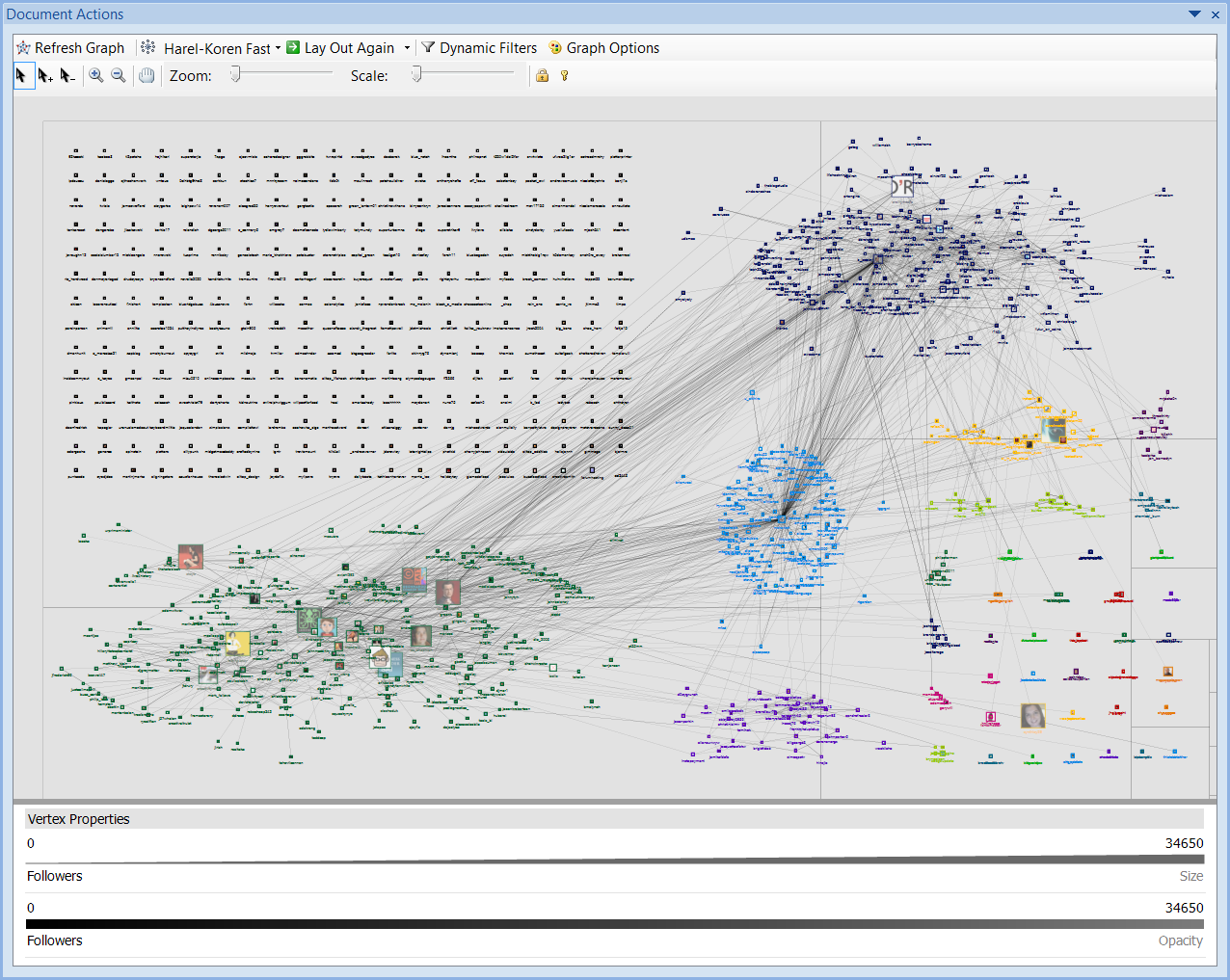
This process of sending messages and serving HTTP requests over the internet works using protocols. In short, we need a system to send data over networks, and then we simply pass HTTP over this system (communication layer), resulting in a WWW on top of the internet.
TCP/IP Protocol
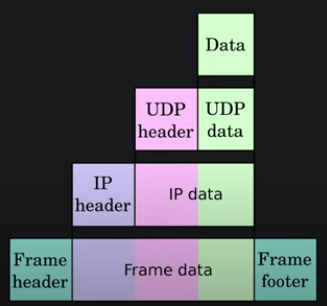
The TCP/IP protocol stack consists of four layers:
- Link Layer: Physical link between computers (wired or wireless)
- Internet Layer: Concerns itself with finding the right destination computer (IP, ARP, ICMP, etc.)
- Transport Layer: Finds the right program on a destination computer (TCP and UDP, and the concept of ports)
- Application Layer: Communicates with the program (HTTP, FTP, SMTP, SSH, etc.)
RFC 1945 - HTTP/1.0 Specification
Link to the RFC: https://datatracker.ietf.org/doc/html/rfc1945
This RFC defines the HTTP protocol, standardizing the HTTP protocol format so that every system works with it and understands other systems.
From the RFC:
1
2
3
The Hypertext Transfer Protocol (HTTP) is an application-level protocol with the lightness and speed necessary for distributed, collaborative, hypermedia information systems. It is a generic, stateless, object-oriented protocol which can be used for many tasks, such as name servers and distributed object management systems, through extension of its request methods (commands). A feature of HTTP is the typing of data representation, allowing systems to be built independently of the data being transferred.

HTTP has been in use by the World-Wide Web global information initiative since 1990. This specification reflects common usage of the protocol referred to as "HTTP/1.0".
Every web server, web client, etc. needs to follow this specification in order to work properly.
Key HTTP Components
- Headers: Metadata fields that carry vital information about the request or response
- Paths: The specific locations or resources you’re aiming to access
- Arguments: Data points that can alter or dictate the behavior of your request
- Form Data: Data transferred from web forms
- JSON: A popular data interchange format that’s lightweight and human-readable
- Cookies: Small data fragments stored on the user’s computer, crucial for session management and tracking
- Redirects: Methods web services use to direct your browser from one location to another
HTTP Format
1. Request-Line (Client)
Format: Method SP Request-URI SP HTTP-Version CRLF
Methods: GET, HEAD, POST
Example:
1
GET / HTTP/1.0
2. Status-Line (Server)
Format: HTTP-Version SP Status-Code SP Reason-Phrase CRLF
Status codes tell the client what the server thinks of the request:
- 1xx: Informational
- 2xx: Success
- 3xx: Redirection
- 4xx: Client Error
- 5xx: Server Error
Example:
1
HTTP/1.0 200 OK
Common Status Codes
| Status Code | Description |
|---|---|
| 200 | OK |
| 201 | Created |
| 204 | No Content |
| 301 | Moved Permanently |
| 302 | Found (Temporary) |
| 304 | Not Modified |
| 400 | Bad Request |
| 401 | Unauthorized |
| 403 | Forbidden |
| 404 | Not Found |
| 500 | Internal Server Error |
| 501 | Not Implemented |
| 502 | Bad Gateway |
| 503 | Service Unavailable |
HTTP Methods
GET Method
The GET method retrieves whatever information (in the form of an entity) is identified by the Request-URI. If the Request-URI refers to a data-producing process, it is the produced data which shall be returned as the entity in the response, not the source text of the process (unless that text happens to be the output of the process).
Request:
1
2
GET /greet HTTP/1.0
Host: hello.example.com
Response:
1
2
3
4
5
HTTP/1.0 200 OK
Content-Type: text/html; charset=UTF-8
Content-Length: 39

<html><body>Hello, World!</body></html>
HEAD Method
The HEAD method is identical to GET except that the server must not return any Entity-Body in the response. The metainformation contained in the HTTP headers in response to a HEAD request should be identical to the information sent in response to a GET request. This method can be used for obtaining metainformation about the resource identified by the Request-URI without transferring the Entity-Body itself. This method is often used for testing hypertext links for validity, accessibility, and recent modification.
Request:
1
2
HEAD /greet HTTP/1.0
Host: hello.example.com
Response:
1
2
3
HTTP/1.0 200 OK
Content-Type: text/html; charset=UTF-8
Content-Length: 39
POST Method
The POST method is used to request that the destination server accept the entity enclosed in the request as a new subordinate of the resource identified by the Request-URI in the Request-Line. POST is designed to allow a uniform method to cover the following functions:
- Annotation of existing resources
- Posting a message to a bulletin board, newsgroup, mailing list, or similar group of articles
- Providing a block of data, such as the result of submitting a form, to a data-handling process
- Extending a database through an append operation
Request:
1
2
3
4
5
6
POST /greet HTTP/1.0
Host: hello.example.com
Content-Length: 11
Content-Type: application/x-www-form-urlencoded

name=Connor
Response:
1
2
HTTP/1.0 200 OK
Content-Length: 0
Full Request and Response Example
Request:
1
2
GET /greet HTTP/1.0
Host: hello.example.com
Response:
1
2
3
4
5
HTTP/1.0 200 OK
Content-Type: text/html; charset=UTF-8
Content-Length: 40

<html><body>Hello, Connor!</body></html>
URL Components and Encoding
A URL (Uniform Resource Locator) is composed of several components:
- Scheme: Protocol used to access the resource
- Host: Host that holds the resource (server)
- Port: Port for the program servicing the resource
- Path: Identifies the specific resource
- Query: Information that the resource can use (how we want to interact with the resource)
- Fragment: Client-side information about the resource, not passed to the server
Format: <scheme>://<host>:<port>/<path>?<query>#<fragment>
Example: http://example.com:80/cat.gif?width=256&height=256#t=2s
URL Encoding
Request-URI Encoding
As we saw in the RFC, the request line must follow this format: Method SP Request-URI SP HTTP-Version CRLF
The Request-URI is a very important component of the URL and gets translated into the HTTP request.
Let’s say we want to access the /Hello World resource. We encounter an issue:
Request:
1
2
GET /Hello World HTTP/1.0
Host: hello.example.com
Response:
1
HTTP/1.0 400 Bad Request
This error, as we saw before, means we are not properly communicating with the server. The server didn’t successfully parse our request.
This is because of the space in the URI. Spaces are delimiters that separate the method, the Request-URI, and the HTTP version. Therefore, including a space in the URI isn’t appropriate.
Character Encoding Solution
The solution to this problem is URL encoding. Certain characters need to be encoded:
1
2
3
Unsafe:      SP, <, >, ", #, %, {, }, |, \, ^, ~, [, ], `
Reserved:    ;, /, ?, :, @, =, &
Unprintable: 0x00 - 0x1F, 0x7F
In HTTP, URLs can contain spaces and other special characters, but they must be encoded. The way these unsafe characters are encoded is by replacing them with a percent sign (%) followed by their hexadecimal ASCII value:
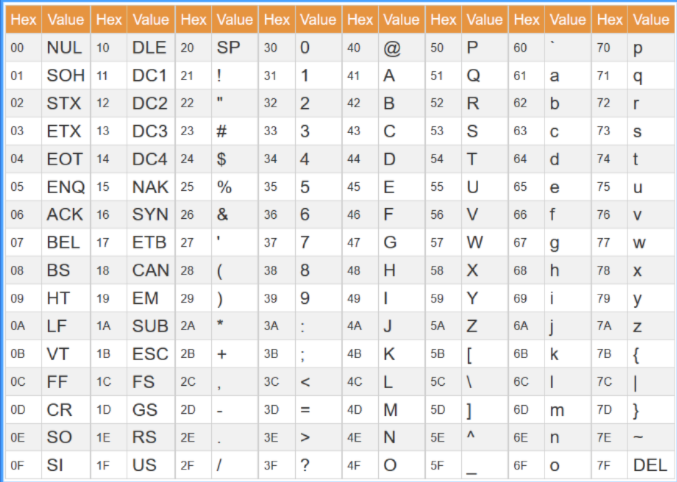
So when writing URLs in requests, we have to encode unsafe characters.
The correct request should be:
Request:
1
2
GET /Hello%20World HTTP/1.0
Host: hello.example.com
Response:
1
2
3
4
5
HTTP/1.0 200 OK
Content-Type: text/html; charset=UTF-8
Content-Length: 39

<html><body>Hello, World!</body></html>
Content Types
There are several content types used to serve requests, especially in the context of posting data.
Form Content-Type
For example, with a form on a website where you can specify a name and post it to the server, you can declare a content type that the server understands:
1
2
3
4
5
6
POST /greet HTTP/1.0
Host: hello.example.com
Content-Length: 11
Content-Type: application/x-www-form-urlencoded

name=Connor
This structure allows us to have multiple fields where each field is represented by its key (in this case, “name”) and its value (“Connor”), separated by an equals sign (=). We can also have multiple values separated by ampersands (&), with proper encoding applied to special characters.
JSON Content-Type
Alternatively, we don’t have to use form URL-encoded content-type; we can use JSON instead.
There are reasons to choose one over the other. JSON (JavaScript Object Notation) allows for more structured data to be sent to a server:
1
2
3
4
5
6
POST /greet HTTP/1.0
Host: hello.example.com
Content-Length: 18
Content-Type: application/json

{"name": "Connor"}
Choosing Between Content Types
The use cases vary depending on the server. Imagine browsing a website with a form where you type your name and submit it. That form might post URL-encoded content to the server, and the server will recognize and understand that content type.
For more hierarchical data that the server needs to handle, or when building complex objects to send to the server, we’ll choose to use JSON.
One common paradigm on the WWW is JSON RESTful APIs. This is a programming pattern where we interact with a remote server by making requests. In this case, we don’t care about HTML and web pages—we just need remote computation. We make API requests to the server and get API responses back, commonly using the JSON content type.
This allows us to push data with JSON to the server for quick computation and receive complex results that aren’t meant to be viewed directly in a browser.
HTTP State Management
Applications on the WWW don’t have to be simple static web apps. They can be more sophisticated and not just serve static resources. Modern web applications are essentially remote programs.
Remote programs are applications sitting on a remote server (not on our own system), and we use the browser to interact with that remote server by speaking HTTP.
Complex programs have a concept called state, which enables features like login functionality. We can interact with the program, and the state of the program evolves over time. It can store data, maintain it, and share it with other users.
The HTTP Stateless Problem
The issue with state on the Web is that HTTP is a stateless protocol. So how do we maintain a concept of state if our protocol is stateless?
We saw previously that we can POST to a resource with a name, and that updates the name. When doing that, it’s not the protocol that’s being stateful—it’s the web application that’s being stateful, and we’re replacing some value in the web app.
By “stateless protocol,” we mean the following: Let’s say we have a program that we can log into using this request:
1
2
3
4
5
6
POST /login HTTP/1.0
Host: account.example.com
Content-Length: 32
Content-Type: application/x-www-form-urlencoded

username=Connor&password=password
We can get a reply from this, but future requests no longer understand that we are logged in because the protocol itself is stateless.
We need a way for the protocol to keep track of our session, but it’s not one of the features of HTTP since it’s stateless.
The solution to this problem is HTTP cookies.
HTTP Cookies
When posting the login request, the server sets a header in the response: Set-Cookie. The client then includes this in future requests with the header: Cookie.
Example Login Flow with Cookies
Initial Login Request:
1
2
3
4
5
6
POST /login HTTP/1.0
Host: account.example.com
Content-Length: 32
Content-Type: application/x-www-form-urlencoded

username=Connor&password=password
Login Response:
1
2
3
HTTP/1.0 302 Moved Temporarily
Location: http://account.example.com/
Set-Cookie: authed=Connor
Follow-up Request (with Cookie):
1
2
3
GET / HTTP/1.0
Host: account.example.com
Cookie: authed=Connor
Follow-up Response:
1
2
3
4
5
6
HTTP/1.0 200 OK
Content-Type: text/html; charset=UTF-8
Content-Length: 40
Connection: close

<html><body>Hello, Connor!</body></html>
We get the 302 status code to indicate that we should use the cookie to continue. The browser follows the redirect and sends a new request to the location specified in the response, including the Set-Cookie value.
The server now understands that there is state embedded within that cookie.
Security Concerns with Simple Cookies
This concept of cookies can be used with malicious intent, such as stealing a cookie and using it to access someone else’s session.
What if we crafted an HTTP request with a cookie that we declare ourselves, rather than one the server provides?
Forged Request:
1
2
3
GET / HTTP/1.0
Host: account.example.com
Cookie: authed=admin
Response:
1
2
3
4
5
6
HTTP/1.0 200 OK
Content-Type: text/html; charset=UTF-8
Content-Length: 39
Connection: close

<html><body>Hello, admin!</body></html>
We just get a normal response! This is because the protocol is stateless and isn’t keeping track of whether we made a login request. It’s simply using cookies to track state. If we provide a cookie with a username, the server accepts it.
This presents a significant security concern. The solution to this problem is to use session IDs.
Session IDs
When we make a proper login request:
Login Request:
1
2
3
4
5
6
POST /login HTTP/1.0
Host: account.example.com
Content-Length: 32
Content-Type: application/x-www-form-urlencoded

username=Connor&password=password
Login Response:
1
2
3
HTTP/1.0 302 Moved Temporarily
Location: http://account.example.com/
Set-Cookie: session_id=A1B2C3D4
Follow-up Request:
1
2
3
GET / HTTP/1.0
Host: account.example.com
Cookie: session_id=A1B2C3D4
Follow-up Response:
1
2
3
4
5
6
HTTP/1.0 200 OK
Content-Type: text/html; charset=UTF-8
Content-Length: 40
Connection: close

<html><body>Hello, Connor!</body></html>
This session ID is cryptographically generated and difficult to guess. The server creates it and stores it in the database with our account associated with it.
Best Practices
Non-sensitive information like themes and settings can be placed directly into cookies since it’s not critical. However, for anything that requires security (like authentication), the server should use session IDs that are:
- Cryptographically secure
- Randomly generated
- Stored server-side
- Associated with the user’s account
- Time-limited and can be invalidated
Making HTTP Requests
Now that we understand the HTTP protocol, let’s look at some practical tools for making HTTP requests. There are several command-line and programmatic ways to interact with web servers using HTTP.
Common Tools
curl - A command-line tool for transferring data with URLs. It supports HTTP, HTTPS, and many other protocols. Great for testing APIs and downloading resources.
nc (netcat) - A networking utility for reading from and writing to network connections. It can be used to manually craft and send HTTP requests, giving you low-level control over the connection.
Python requests library - A popular Python library that makes HTTP requests simple and human-friendly. Perfect for building web scrapers, API clients, and automation scripts.
Each of these tools has its own use cases:
- Use curl for quick testing and scripting
- Use nc when you need to understand the raw HTTP protocol
- Use Python requests when building applications that need to interact with web services
In the next sections, we’ll explore practical examples of using these tools to make HTTP requests.
Conclusion
Understanding HTTP and the World Wide Web is fundamental to modern web development and networking. From the basic concepts of hypertext and URLs to the intricacies of state management and security, HTTP provides a standardized way for systems to communicate over the internet.
Key takeaways:
- HTTP is a stateless, application-layer protocol that powers the Web
- URLs must be properly encoded to handle special characters
- State management is achieved through cookies and session IDs
- Security considerations are crucial when implementing authentication
- Various tools exist for testing and interacting with HTTP services
This knowledge forms the foundation for building robust web applications and understanding how the internet works at a fundamental level.