Sockets in the linux system
Understanding Linux processes, network programming with sockets, handling HTTP requests, and managing concurrent connections with fork().
Building a Basic Web Server: From Syscalls to HTTP
Introduction
A program is a bunch of instructions that run and use the CPU registers and stack as places to hold values, make calculations, etc. It is not possible for a program like this to talk directly to the hardware and tell it what to do. For that, the program needs to pass through the kernel using syscalls.
Understanding Linux Processes
In order for a program to access the hardware, it uses syscalls. Some examples are:
1
2
int read(int fd, void *buff, size_t count);
int open(char *pathname, int flags, mode_t mode);
The read syscall takes arguments and reads data from a file.
The return value of open, for example, is a file descriptor, which is an integer that uniquely identifies an open file in a process. The kernel manages the state - the system calls go out and perform something and return a file descriptor. If it was an open call, you might need to read from the file using the same file descriptor number. The execution of syscalls and state management are handled by the kernel.
The kernel stores the state before doing anything, and this is to return back. The state is saved by processes:
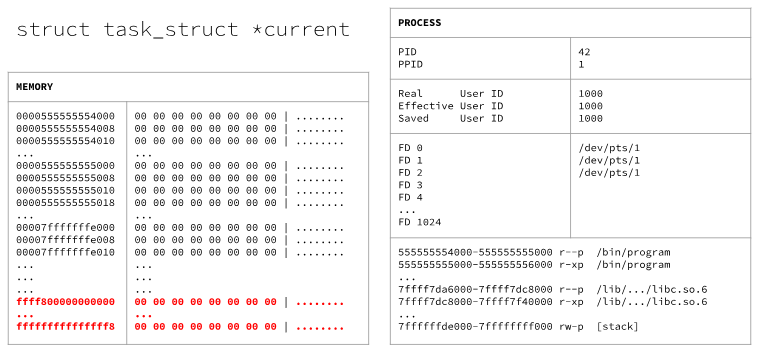
The kernel keeps track of everything: pages of memory the program is using, libraries, where the stack is, and more. It’s like a program is executing and suddenly another one should be executing, stopping the one that was executing and saving its process state, then swapping states.
In Linux, the blob of data that manages all of the states is called struct task_struct.
In the Linux kernel source code, there is a global variable called current that keeps track of the current executing process. The processes are saved in kernel memory.
So a Linux process is saved data in the kernel memory, and when syscalls are called, this memory is manipulated.
When a syscall is called, the program flow goes to the kernel control code to execute in it (the kernel is a library of code) and do what the syscall requested. Things are done in the process table - a file descriptor is added with the requested thing from the syscall. When the flow returns to the program, the file descriptor is saved inside the RAX register, which contains the result of the system call.
The number saved in RAX can be used multiple times since the kernel registered it in the process table saved in kernel memory.
Network System Calls
Let’s look at some examples of syscalls for accessing the internet:
socket
1
int socket(int domain, int type, int protocol)
This creates a type of file. We say a socket is a type of file because, in Unix/Linux, the kernel exposes sockets through the same file-descriptor interface as regular files. Not because a socket is stored on disk, but because it behaves like a file from the process’s point of view.
The networking file concept is called a socket. This syscall creates an endpoint for communication and returns a file descriptor that refers to that endpoint. It behaves like a file because it is.
bind
1
int bind(int sockfd, struct sockaddr *addr, socklen_t addrlen)
This syscall takes as its first argument sockfd, which is the file descriptor returned by the socket syscall.
When a socket is created with socket(), it exists in a namespace (address family) but has no address assigned to it. bind() assigns the address specified by addr to the socket referred to by the file descriptor.
struct sockaddr
1
2
3
4
5
6
7
8
9
10
11
struct sockaddr {
    uint16_t sa_family;
    uint8_t sa_data[14];
};

struct sockaddr_in {
    uint16_t sin_family;
    uint16_t sin_port;
    uint32_t sin_addr;
    uint8_t __pad[8];
}
These are just data structures, 16 bytes in length, that represent a socket address. sockaddr is a generic type because the very first two bytes specify the type of socket (sa_family).
There is also a sockaddr_in that is a specific type of sockaddr, also 16 bytes in size, and also starting with the same 2 bytes. It uses the remaining data to represent the port and the interface address to bind to, as well as 8 bytes of padding.
These structures live in memory and we specify what we want:
1
2
3
4
5
6
struct sockaddr_in {
    AF_INET;           // 2 bytes
    htons(80);         // 2 bytes (port)
    {inet_addr("127.0.0.1")};  // 4 bytes (IP address)
    uint8_t __pad[8];  // 8 bytes padding
}
- The type of family we’re going to specify is
AF_INET, which is a constant of 2 - The second parameter is the port, specified by
htons(80), which means host to network short - it just converts the number to big endian - The next thing to specify is the interface we want to bind to:
inet_addr("127.0.0.1"), saved in big endian - And finally, the padding
We can find these in memory:
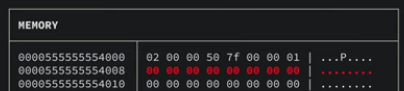
What’s in red is the padding (look at the structure above).
listen
1
int listen(int sockfd, int backlog)
We need to listen for connections. This makes the socket referred to by sockfd a passive socket to accept requests using the accept syscall.
accept
1
int accept(int sockfd, struct sockaddr *addr, socklen_t *addrlen)
This is used with connection-based socket types (SOCK_STREAM, SOCK_SEQPACKET). It extracts the first connection request from the queue of pending connections for the listening socket, and returns a new file descriptor referring to that socket.
The result is a new socket with a new file descriptor that represents a direct communication over that specific connection.
Steps to Accept TCP/IP Network Connections
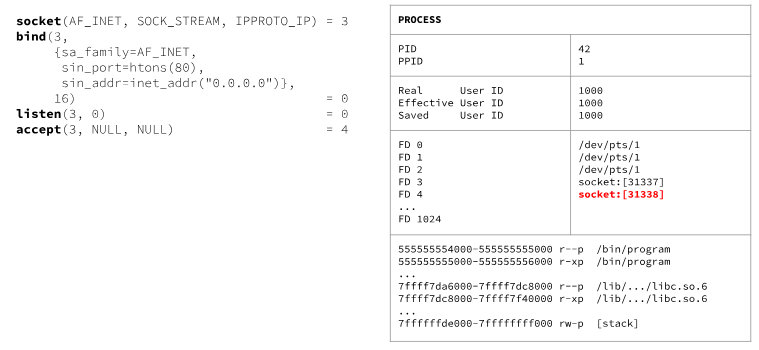
Handling HTTP Requests
Recall the steps to accept network connections. Once someone connects and talks to our process (the program that we built) and sends us an HTTP request (e.g., GET / HTTP/1.0), we can directly write to the file descriptor of the connection using the write() syscall:
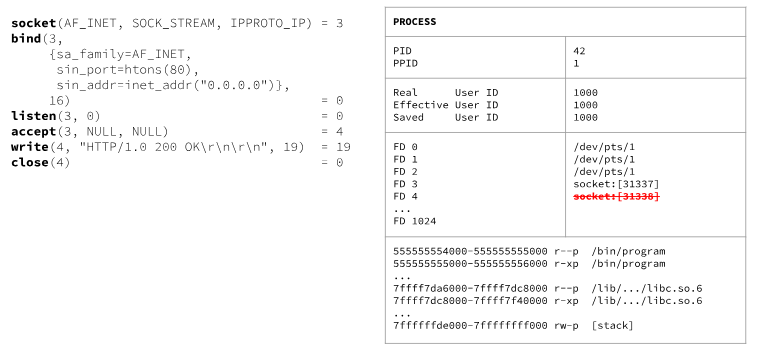
So we just got an HTTP request and sent an HTTP response. This is a (prehistoric) way that a web server operates - it did not read from the GET request, it just sent something every time a connection was made and then closed it.
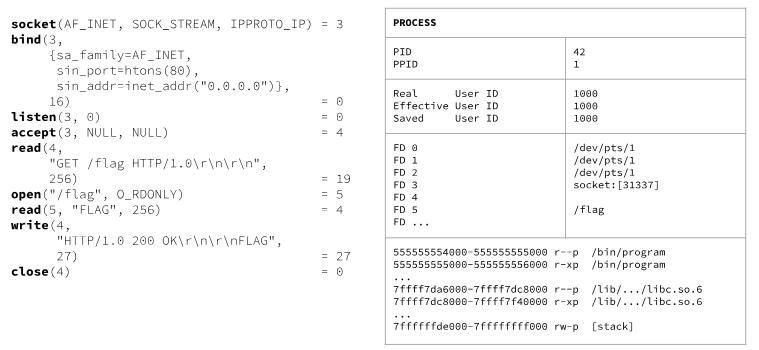
What if in the HTTP request we get a flag like GET /flag HTTP/1.0? This time we will read the request using read(), parse and manipulate it, open the flag file and read it, then send an HTTP response depending on the flag:
Multiprocessing
We talked about the steps we need to perform in order to accept a network connection over TCP/IP. But what happens when we have multiple requests? It’s not possible to go one at a time - we need to handle everything at once.
There is a syscall for that.
fork
fork() creates a new process by duplicating the calling process. The new process is referred to as the child process. The calling process is referred to as the parent process.
How does this work? On success, the PID of the child process is returned in the parent, and 0 is returned in the child.
We can do different computations since we know who is the child and who is the parent. These two new processes can execute different code because we have a value to compare against.
We get a duplicate of the parent process with some things updated. Modifying one doesn’t modify the other.