Intro to Windows x64 Assembly
A comprehensive guide to x64 Windows assembly covering number systems, registers, instructions, CPU flags, calling conventions, stack frames, and reverse engineering fundamentals for security researchers and low-level programmers.
Before diving into low level concepts we need first to familiarize with some basic concepts such as number systems, bits and bytes etc…
Debrief
Number Systems
In reverse engineering the most important number systems needed are binary and hexadecimal. Hexadecimal is made to facilitate the reading of long binary addresses or values.
in a 64 bit system a binary can go up to 64 bits long so 64 ones and zeros however using hex will simplify it to 16 digits since each 4 bits is equal to one hex digit.
binary is also called base 2 because it is composed only of 1 and 0. hex is the other hand is base 15 from 1 to f:
| Hex | Decimal | Binary |
|---|---|---|
| 0 | 0 | 0000 |
| 1 | 1 | 0001 |
| 2 | 2 | 0010 |
| 3 | 3 | 0011 |
| 4 | 4 | 0100 |
| 5 | 5 | 0101 |
| 6 | 6 | 0110 |
| 7 | 7 | 0111 |
| 8 | 8 | 1000 |
| 9 | 9 | 1001 |
| A | 10 | 1010 |
| B | 11 | 1011 |
| C | 12 | 1100 |
| D | 13 | 1101 |
| E | 14 | 1110 |
| F | 15 | 1111 |
Bits and Bytes
Data type sizes vary based on architecture. These are the most common sizes :
- Bit is one binary digit. Can be 0 or 1.
- Nibble is 4 bits.
- Byte is 8 bits.
- Word is 2 bytes.
- Double Word (DWORD) is 4 bytes. Twice the size of a word.
- Quad Word (QWORD) is 8 bytes. Four times the size of a word.
Signed numbers can be positive or negative. Unsigned numbers can only be positive. The names come from how they work. Signed numbers need a sign bit to distinguish whether or not they’re negative, similar to how we use the + and - signs.
Offsets
Data positions are referenced by how far away they are from the address of the first byte of data, known as the base address (or just the address), of the variable. The distance a piece of data is from its base address is considered the offset. For example, let’s say we have some data, 12345678. Just to push the point, let’s also say each number is 2 bytes. With this information, 1 is at offset 0x0, 2 is at offset 0x2, 3 is at offset 0x4, 4 is at offset 0x6, and so on. You could reference these values with the format BaseAddress+0x##. BaseAddress+0x0 or just BaseAddress would contain the 1, BaseAddress+0x2 would be the 2, and so on.
Binary operations
| Operation | Symbol | Description | Example (4-bit) | Result |
|---|---|---|---|---|
| AND | & | Returns 1 only if both bits are 1 | 1100 & 1010 | 1000 |
| OR | \| | Returns 1 if either bit is 1 | 1100 \| 1010 | 1110 |
| XOR | ^ | Returns 1 if bits are different | 1100 ^ 1010 | 0110 |
| NOT | ~ | Inverts all bits (1→0, 0→1) | ~1100 | 0011 |
| Left Shift | << | Shifts bits left, fills with 0s | 1100 << 1 | 1000 |
| Right Shift | >> | Shifts bits right, fills with 0s* | 1100 >> 1 | 0110 |
Assembly
The end goal of a compiler is to translate high-level code into a language the CPU can understand. This language is Assembly. The CPU supports various instructions that all work together doing things such as moving data, performing comparisons, doing things based on comparisons, modifying values, and anything else that you can think of. While we may not have the high-level source code for any program, we can get the Assembly code from the executable.
1
2
3
4
5
if(x == 4){
    func1();
}else{
    return;
}
this C code will be translated to :
1
2
3
4
5
mov RAX, x
cmp RAX, 4
jne 5       ; Line 5 (ret)
call func1
ret
First, the variable x is moved into RAX. RAX is a register, think of it as a variable in assembly. Then, we compare that with 4. If the comparison between RAX (4) and 5 results in them not being equal then jump (jne) to line 5 which returns. Otherwise, they are equal, so call func1().
Registers
Depending on whether you are working with 64-bit or 32-bit assembly things may be a little different. As already mentioned this course focuses on 64-bit Windows.
Let’s talk about General Purpose Registers (GPR). You can think of these as variables because that’s essentially what they are. The CPU has its own storage that is extremely fast. This is great, however, space in the CPU is extremely limited. Any data that’s too big to fit in a register is stored in memory (RAM). Accessing memory is much slower for the CPU compared to accessing a register. Because of the slow speed, the CPU tries to put data in registers instead of memory if it can. If the data is too large to fit in a register, a register will hold a pointer to the data so it can be accessed.
- RAX store functions return values
- RBX base pointer to the data section
- RCX counter for string and loop operations
- RDX I/O pointer or the data register
- RSI source index pointer for string operations
- RDI destination index pointer for string operations
- RSP stack top pointer
- RBP stack frame base pointer
- RIP pointer to the next instruction to execute (instruction pointer)
RSP and RBP should almost always only be used for what they were designed for. They store the location of the current stack frame (we’ll get into the stack soon) which is very important. If you do use RBP or RSP, you’ll want to save their values so you can restore them to their original state when you are finished. As we go along, you’ll get the hang of the importance of various registers at different stages of execution.
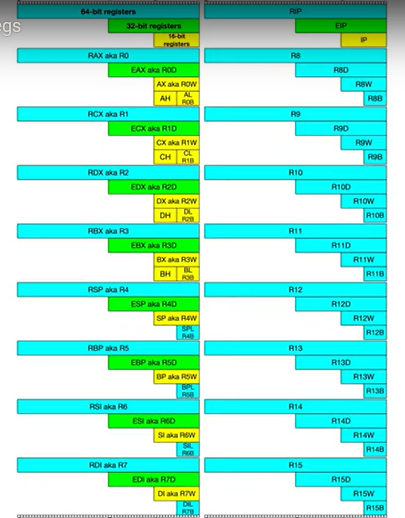
Each register can be broken down into smaller segments which can be referenced with other register names. RAX is 64 bits, the lower 32 bits can be referenced with EAX, and the lower 16 bits can be referenced with AX. AX is broken down into two 8 bit portions. The high/upper 8 bits of AX can be referenced with AH. The lower 8 bits can be referenced with AL.
If 0x0123456789ABCDEF was loaded into a 64-bit register such as RAX, then RAX refers to 0x0123456789ABCDEF, EAX refers to 0x89ABCDEF, AX refers to 0xCDEF, AH refers to 0xCD, AL refers to 0xEF.
What is the difference between the “E” and “R” prefixes? Besides one being a 64-bit register and the other 32 bits, the “E” stands for extended. The “R” stands for register. The “R” registers were newly introduced in x64, and no, you won’t see them on 32-bit systems.
instruction pointer
RIP is the “Instruction Pointer”. It is the address of the next line of code to be executed. You cannot directly write into this register, only certain instructions such as ret can influence the instruction pointer.
Instructions
The ability to read and comprehend assembly code is vital to reverse engineering. There are roughly 1,500 instructions, however, a majority of the instructions are not commonly used or they’re just variations (such as MOV and MOVS). Just like in high-level programming, don’t hesitate to look up something you don’t know.
Before we get started there are three different terms you should know: immediate, register, and memory.
- An immediate value (or just immediate, sometimes IM) is something like the number 12. An immediate value is not a memory address or register, instead, it’s some sort of constant data.
- A register is referring to something like RAX, RBX, R12, AL, etc.
- Memory or a memory address refers to a location in memory (a memory address) such as 0x7FFF842B.
Data Movement Instructions
| Instruction | Syntax | Description | Example |
|---|---|---|---|
| MOV | MOV dest, src | Copy data from source to destination | MOV EAX, EBX |
| PUSH | PUSH src | Push value onto stack | PUSH EAX |
| POP | POP dest | Pop value from stack | POP EBX |
| LEA | LEA dest, src | Load effective address | LEA EAX, [EBX+8] |
| XCHG | XCHG op1, op2 | Exchange values | XCHG EAX, EBX |
Arithmetic Instructions
| Instruction | Syntax | Description | Example |
|---|---|---|---|
| ADD | ADD dest, src | Add source to destination | ADD EAX, 5 |
| SUB | SUB dest, src | Subtract source from destination | SUB EAX, EBX |
| INC | INC dest | Increment by 1 | INC ECX |
| DEC | DEC dest | Decrement by 1 | DEC ECX |
| MUL | MUL src | Unsigned multiply (EAX * src) | MUL EBX |
| IMUL | IMUL src | Signed multiply | IMUL EBX |
| DIV | DIV src | Unsigned divide (EDX:EAX / src) | DIV EBX |
| IDIV | IDIV src | Signed divide | IDIV EBX |
| NEG | NEG dest | Two’s complement negation | NEG EAX |
Logical/Bitwise Instructions
| Instruction | Syntax | Description | Example |
|---|---|---|---|
| AND | AND dest, src | Bitwise AND | AND EAX, 0xFF |
| OR | OR dest, src | Bitwise OR | OR EAX, EBX |
| XOR | XOR dest, src | Bitwise XOR | XOR EAX, EAX |
| NOT | NOT dest | Bitwise NOT (one’s complement) | NOT EAX |
| SHL | SHL dest, count | Shift left logical | SHL EAX, 2 |
| SHR | SHR dest, count | Shift right logical | SHR EAX, 1 |
| SAL | SAL dest, count | Shift arithmetic left | SAL EAX, 3 |
| SAR | SAR dest, count | Shift arithmetic right | SAR EAX, 1 |
| ROL | ROL dest, count | Rotate left | ROL EAX, 4 |
| ROR | ROR dest, count | Rotate right | ROR EAX, 2 |
Comparison Instructions
| Instruction | Syntax | Description | Example |
|---|---|---|---|
| CMP | CMP op1, op2 | Compare (subtract without storing) | CMP EAX, 10 |
| TEST | TEST op1, op2 | Logical compare (AND without storing) | TEST EAX, EAX |
Control Flow Instructions
| Instruction | Syntax | Description | Example |
|---|---|---|---|
| JMP | JMP label | Unconditional jump | JMP start |
| JE/JZ | JE label | Jump if equal/zero | JE equal_label |
| JNE/JNZ | JNE label | Jump if not equal/not zero | JNE not_equal |
| JG/JNLE | JG label | Jump if greater (signed) | JG greater |
| JL/JNGE | JL label | Jump if less (signed) | JL less |
| JA/JNBE | JA label | Jump if above (unsigned) | JA above |
| JB/JNAE | JB label | Jump if below (unsigned) | JB below |
| CALL | CALL label | Call procedure | CALL function |
| RET | RET | Return from procedure | RET |
| LOOP | LOOP label | Decrement ECX and jump if not zero | LOOP loop_start |
String Instructions
| Instruction | Syntax | Description | Example |
|---|---|---|---|
| MOVS | MOVSB/MOVSW/MOVSD | Move string (byte/word/dword) | MOVSB |
| CMPS | CMPSB/CMPSW/CMPSD | Compare strings | CMPSB |
| SCAS | SCASB/SCASW/SCASD | Scan string | SCASB |
| LODS | LODSB/LODSW/LODSD | Load string | LODSB |
| STOS | STOSB/STOSW/STOSD | Store string | STOSB |
| REP | REP instruction | Repeat while ECX ≠ 0 | REP MOVSB |
Miscellaneous Instructions
| Instruction | Syntax | Description | Example |
|---|---|---|---|
| NOP | NOP | No operation (do nothing) | NOP |
| INT | INT num | Software interrupt | INT 0x80 |
| SYSCALL | SYSCALL | System call (64-bit) | SYSCALL |
| CPUID | CPUID | CPU identification | CPUID |
| RDTSC | RDTSC | Read time-stamp counter | RDTSC |
Flags
Flags are used to signify the result of the previously executed operation or comparison. For example, if two numbers are compared to each other the flags will reflect the results such as them being even. Flags are contained in a register called EFLAGS (x86) or RFLAGS (x64). I usually just refer to it as the flags register. There is an actual FLAGS register that is 16 bit, but the semantics are just a waste of time. If you want to get into that stuff, look it up, Wikipedia has a good article on it. I’ll tell you what you need to know.
Here are comprehensive tables of x86 CPU flags:
Status Flags (EFLAGS/RFLAGS Register)
| Flag | Bit | Symbol | Name | Description | Set When | Common Use |
|---|---|---|---|---|---|---|
| CF | 0 | Carry Flag | Carry | Set if arithmetic operation generates a carry/borrow | Unsigned overflow occurs | Unsigned arithmetic overflow detection |
| PF | 2 | Parity Flag | Parity | Set if low byte has even number of 1s | Low 8 bits have even parity | Error checking, rarely used in modern code |
| AF | 4 | Auxiliary Flag | Adjust | Set if carry from bit 3 to bit 4 | BCD arithmetic needs adjustment | Binary-Coded Decimal (BCD) operations |
| ZF | 6 | Zero Flag | Zero | Set if result is zero | Result = 0 | Testing equality, null checks |
| SF | 7 | Sign Flag | Sign | Set if result is negative (MSB = 1) | Most significant bit = 1 | Signed number sign detection |
| TF | 8 | Trap Flag | Trap | Enable single-step debugging | Set by debugger | Single-step execution mode |
| IF | 9 | Interrupt Flag | Interrupt Enable | Enable/disable maskable interrupts | Interrupts enabled | Interrupt handling control |
| DF | 10 | Direction Flag | Direction | String operation direction | Set = decrement, Clear = increment | String operation control (MOVS, CMPS, etc.) |
| OF | 11 | Overflow Flag | Overflow | Set if signed arithmetic overflow | Signed overflow occurs | Signed arithmetic overflow detection |
| IOPL | 12-13 | I/O Privilege | I/O Privilege Level | Current privilege level for I/O operations | Set by OS | Protected mode I/O access control |
| NT | 14 | Nested Task | Nested Task | Indicates nested task | Task switch occurred | Task management (rarely used) |
| RF | 16 | Resume Flag | Resume | Temporarily disable debug exceptions | Set before returning from exception | Debug exception control |
| VM | 17 | Virtual Mode | Virtual 8086 | Enable virtual 8086 mode | Virtual mode active | Running 16-bit code in protected mode |
| AC | 18 | Alignment Check | Alignment Check | Enable alignment checking | Alignment check enabled | Memory alignment verification |
| VIF | 19 | Virtual IF | Virtual Interrupt | Virtual image of IF flag | Virtual interrupt state | Virtualization support |
| VIP | 20 | Virtual IP | Virtual Interrupt Pending | Virtual interrupt pending | Virtual interrupt pending | Virtualization support |
| ID | 21 | ID Flag | Identification | Ability to modify CPUID flag | CPUID instruction supported | CPUID capability detection |
Calling conventions
When a function is called you could, theoretically, pass parameters via registers, the stack, or even on disk. You just need to be sure that the function you are calling knows where you’re putting the parameters. This isn’t too big of a problem if you are using your own functions, but things would get messy when you start using libraries. To solve this problem we have calling conventions that define how parameters are passed to a function, who allocates space for variables, and who cleans up the stack.
Callee refers to the function being called, and the caller is the function making the call.
There are several different calling conventions including cdecl, syscall, stdcall, fastcall, and more. Because I’ve chosen to focus on x64 Windows for simplicity, we will be working with x64 fastcall. If you plan to reverse engineer on other platforms, be sure to learn their respective calling convention(s).
Fastcall
Fastcall is the calling convention for x64 Windows. Windows uses a four-register fastcall calling convention by default. Quick FYI, when talking about calling conventions you will hear about something called the “Application Binary Interface” (ABI). The ABI defines various rules for programs such as calling conventions, parameter handling, and more. Key Rules for x64 Windows Fastcall:
Parameter Passing:
- First 4 parameters are passed in registers (left to right): RCX, RDX, R8, R9
- Additional parameters (5th and beyond) are pushed onto the stack from right to left
- Integer and pointer parameters use the general-purpose registers
- Floating-point parameters use XMM0, XMM1, XMM2, XMM3
Shadow Space (Home Space):
- The caller must allocate 32 bytes (0x20) of “shadow space” on the stack
- This reserves space for the first 4 register parameters even though they’re passed in registers
- The callee can use this space to spill register values if needed
- Shadow space must be allocated even if the function has fewer than 4 parameters
Stack Alignment:
- The stack must be 16-byte aligned before a CALL instruction
- CALL pushes an 8-byte return address, so the function entry point has RSP+8 alignment
- Functions must maintain 16-byte alignment for any further CALL instructions
Return Values:
- Integer/pointer return values use RAX
- Floating-point return values use XMM0
- Large structures (>8 bytes) are returned via a pointer passed in RCX
Volatile (Caller-Saved) Registers:
- RAX, RCX, RDX, R8, R9, R10, R11
- XMM0-XMM5
- These registers can be modified by the callee without saving
- The caller must save these if it needs their values after the call
Non-Volatile (Callee-Saved) Registers:
- RBX, RBP, RDI, RSI, RSP, R12, R13, R14, R15
- XMM6-XMM15
- The callee must preserve these and restore them before returning
Example Function Call:
1
2
int MyFunction(int a, int b, int c, int d, int e, int f);
result = MyFunction(1, 2, 3, 4, 5, 6);
1
2
3
4
5
6
7
8
9
10
11
; Caller prepares the call
sub rsp, 0x28          ; Allocate shadow space (32 bytes) + alignment
mov dword ptr [rsp+0x20], 6   ; 6th parameter on stack
mov dword ptr [rsp+0x28], 5   ; 5th parameter on stack
mov r9d, 4             ; 4th parameter in R9
mov r8d, 3             ; 3rd parameter in R8
mov edx, 2             ; 2nd parameter in RDX
mov ecx, 1             ; 1st parameter in RCX
call MyFunction
add rsp, 0x28          ; Clean up stack (caller cleanup)
; Return value is now in RAX
Other Calling Conventions (32-bit)
While we focus on x64, understanding 32-bit conventions is useful for legacy code analysis:
cdecl (C Declaration):
- Parameters pushed on stack from right to left
- Caller cleans up the stack
- Return value in EAX
- Most commonly used in C/C++ on x86
stdcall (Standard Call):
- Parameters pushed on stack from right to left
- Callee cleans up the stack (key difference from cdecl)
- Return value in EAX
- Used by Windows API functions
thiscall:
- Used for C++ class member functions
thispointer passed in ECX- Other parameters pushed on stack from right to left
- Callee cleans up the stack
Comparison Table:
| Convention | Parameters | Cleanup | Return Value | Usage |
|---|---|---|---|---|
| x64 Fastcall | RCX, RDX, R8, R9, then stack | Caller | RAX/XMM0 | x64 Windows standard |
| cdecl | Stack (right to left) | Caller | EAX | x86 C/C++ |
| stdcall | Stack (right to left) | Callee | EAX | x86 Windows API |
| thiscall | ECX (this), stack | Callee | EAX | x86 C++ methods |
The Stack
The stack is a fundamental data structure in computer architecture that operates on a Last-In-First-Out (LIFO) principle. Think of it like a stack of plates - you add plates to the top and remove plates from the top.
Stack Characteristics
Memory Layout:
- The stack grows downward in memory (from high addresses to low addresses)
- RSP (Stack Pointer) always points to the top of the stack
- When you PUSH data, RSP decreases (moves to a lower address)
- When you POP data, RSP increases (moves back to a higher address)
Visual Representation:
1
2
3
4
5
6
7
8
9
High Memory (0x7FFF...)
    |
    |  Older data
    |  [0x1000] <- Previous stack frame
    |  [0x0FF8]
    |  [0x0FF0] <- Current top (RSP)
    |  [0x0FE8] <- Stack grows this way
    ↓
Low Memory (0x0000...)
Stack Operations
PUSH Instruction:
1
2
3
push rax           ; Equivalent to:
                   ; sub rsp, 8
                   ; mov [rsp], rax
- Decrements RSP by 8 bytes (size of register in x64)
- Writes the value to the memory location RSP points to
POP Instruction:
1
2
3
pop rax            ; Equivalent to:
                   ; mov rax, [rsp]
                   ; add rsp, 8
- Reads the value from the memory location RSP points to
- Increments RSP by 8 bytes
Example Stack Usage:
1
2
3
4
5
push rbx           ; Save RBX (RSP = RSP - 8)
push rcx           ; Save RCX (RSP = RSP - 8)
; ... do work ...
pop rcx            ; Restore RCX (RSP = RSP + 8)
pop rbx            ; Restore RBX (RSP = RSP + 8)
Important Notes:
- Values must be popped in reverse order of how they were pushed
- The stack must remain balanced (same RSP value on function entry and exit)
- Corrupting the stack leads to crashes or unpredictable behavior
Stack Frames
A stack frame (also called an activation record) is the portion of the stack allocated for a single function call. Each function gets its own frame that contains:
- Local variables
- Saved register values
- Return address
- Function parameters (beyond the first 4 in x64)
- Shadow space (x64 Windows)
Stack Frame Structure
1
2
3
4
5
6
7
8
9
10
11
12
13
14
15
16
17
18
High Memory
    +------------------+
    | Parameter 6      | [RBP + 0x30]
    | Parameter 5      | [RBP + 0x28]
    +------------------+
    | Return Address   | [RBP + 0x08] <- Pushed by CALL
    +------------------+
    | Saved RBP        | [RBP + 0x00] <- Current RBP points here
    +------------------+
    | Local Var 1      | [RBP - 0x08]
    | Local Var 2      | [RBP - 0x10]
    | Local Var 3      | [RBP - 0x18]
    +------------------+
    | Saved Registers  | [RBP - 0x20]
    +------------------+
    | Shadow Space     | [RSP + 0x00] <- Current RSP
    +------------------+
Low Memory
Function Prologue and Epilogue
Prologue (Function Entry): The prologue sets up the stack frame at the beginning of a function.
1
2
3
4
5
; Standard prologue
push rbp              ; Save caller's base pointer
mov rbp, rsp          ; Set up new base pointer
sub rsp, 0x40         ; Allocate space for locals (64 bytes)
                      ; Space includes locals + shadow space + alignment
What the prologue does:
- Saves the caller’s RBP so it can be restored later
- Sets RBP to the current stack pointer (establishes frame base)
- Allocates space for local variables by moving RSP down
Epilogue (Function Exit): The epilogue tears down the stack frame before returning.
1
2
3
4
; Standard epilogue
mov rsp, rbp          ; Restore stack pointer (deallocate locals)
pop rbp               ; Restore caller's base pointer
ret                   ; Return to caller
Alternatively, you can use the leave instruction which combines the first two steps:
1
2
leave                 ; Equivalent to: mov rsp, rbp; pop rbp
ret
What the epilogue does:
- Restores RSP to point where RBP points (deallocates local variables)
- Pops the saved RBP value back into RBP
- Returns control to the caller (RET pops return address and jumps to it)
Complete Function Example
Let’s see a complete function with proper stack frame management:
1
2
3
4
int Add(int a, int b, int c, int d, int e) {
    int result = a + b + c + d + e;
    return result;
}
1
2
3
4
5
6
7
8
9
10
11
12
13
14
15
16
17
18
19
Add:
    ; === PROLOGUE ===
    push rbp              ; Save caller's RBP
    mov rbp, rsp          ; Set up our frame base
    sub rsp, 0x20         ; Allocate 32 bytes (shadow space)

    ; Parameters are in: RCX=a, RDX=b, R8=c, R9=d, [RBP+0x30]=e

    ; === FUNCTION BODY ===
    mov eax, ecx          ; EAX = a
    add eax, edx          ; EAX = a + b
    add eax, r8d          ; EAX = a + b + c
    add eax, r9d          ; EAX = a + b + c + d
    add eax, [rbp+0x30]   ; EAX = a + b + c + d + e

    ; === EPILOGUE ===
    mov rsp, rbp          ; Restore stack pointer
    pop rbp               ; Restore caller's RBP
    ret                   ; Return (value already in RAX)
Stack Frame with Local Variables
Here’s a more complex example with local variables:
1
2
3
4
5
6
void ProcessData(int x, int y) {
    int temp1 = x * 2;
    int temp2 = y * 3;
    int result = temp1 + temp2;
    DoSomething(result);
}
1
2
3
4
5
6
7
8
9
10
11
12
13
14
15
16
17
18
19
20
21
22
23
24
25
26
27
28
29
30
31
32
33
34
35
36
37
38
ProcessData:
    ; === PROLOGUE ===
    push rbp
    mov rbp, rsp
    sub rsp, 0x40         ; Allocate space: 16 bytes locals + 32 shadow + 8 align

    ; Save non-volatile registers if we use them
    push rbx
    push rsi

    ; RCX = x, RDX = y

    ; === FUNCTION BODY ===
    ; int temp1 = x * 2
    mov eax, ecx          ; EAX = x
    shl eax, 1            ; EAX = x * 2 (left shift = multiply by 2)
    mov [rbp-0x08], eax   ; Store temp1

    ; int temp2 = y * 3
    mov eax, edx          ; EAX = y
    imul eax, 3           ; EAX = y * 3
    mov [rbp-0x10], eax   ; Store temp2

    ; int result = temp1 + temp2
    mov eax, [rbp-0x08]   ; EAX = temp1
    add eax, [rbp-0x10]   ; EAX = temp1 + temp2
    mov [rbp-0x18], eax   ; Store result

    ; Call DoSomething(result)
    mov ecx, [rbp-0x18]   ; ECX = result (first parameter)
    call DoSomething

    ; === EPILOGUE ===
    pop rsi               ; Restore saved registers
    pop rbx
    mov rsp, rbp
    pop rbp
    ret
Why Use RBP?
You might wonder why we use RBP when we could just use RSP with offsets. Here are the reasons:
- Fixed Reference Point: RBP stays constant throughout the function, making it easy to reference locals and parameters with fixed offsets
- RSP Changes: RSP can change during function execution (PUSH/POP operations, dynamic allocation), making it unreliable as a reference
- Debugging: Debuggers use RBP to walk the call stack and show stack traces
- Convention: It’s the standard practice, making code more readable
Example of RSP instability:
1
2
3
4
5
6
7
8
mov rsp, rbp
sub rsp, 0x20         ; RSP now at RBP-0x20

push rax              ; RSP now at RBP-0x28 (oops!)
; If you were using RSP offsets, all your offsets are now wrong!

; With RBP, you can still access locals reliably:
mov eax, [rbp-0x08]   ; Always works, regardless of PUSH/POP
Leaf Functions
A leaf function is a function that doesn’t call any other functions. These can sometimes skip the prologue/epilogue:
1
2
3
4
5
SimpleAdd:
    ; No prologue needed - we don't modify stack
    mov eax, ecx          ; EAX = first parameter
    add eax, edx          ; EAX += second parameter
    ret                   ; Return immediately
However, on x64 Windows, you still typically need to allocate shadow space if you call any functions.
Stack Alignment
Stack alignment is crucial for performance and correctness, especially with SIMD instructions.
Rules:
- Stack must be 16-byte aligned before a CALL instruction
- CALL pushes 8 bytes (return address), so function entry is misaligned by 8
- Functions must maintain alignment for any nested calls
Example:
1
2
3
4
5
6
7
8
; At function entry: RSP is 16-byte aligned + 8 (from CALL)
push rbp              ; RSP now 16-byte aligned
mov rbp, rsp
sub rsp, 0x20         ; Allocate 32 bytes (maintains 16-byte alignment)

; Before calling another function:
; RSP must be 16-byte aligned + 8 (accounting for upcoming CALL)
call SomeFunction     ; CALL will push 8 bytes, making it 16-byte aligned
Common mistake:
1
2
sub rsp, 0x18         ; Allocates 24 bytes - NOT 16-byte aligned!
; This will cause issues with aligned memory operations
Correct:
1
sub rsp, 0x20         ; Allocates 32 bytes - maintains alignment
Stack Overflow and Buffer Overflows
Understanding the stack is crucial for security. Stack-based vulnerabilities are common attack vectors.
Buffer Overflow Example
1
2
3
4
void VulnerableFunction(char *input) {
    char buffer[16];
    strcpy(buffer, input);  // No bounds checking!
}
1
2
3
4
5
6
7
8
9
10
11
12
13
14
15
16
17
Before overflow:
    +------------------+
    | Return Address   | [RBP + 0x08]
    +------------------+
    | Saved RBP        | [RBP + 0x00]
    +------------------+
    | buffer[16]       | [RBP - 0x10]
    +------------------+

After overflow with 32-byte input:
    +------------------+
    | OVERWRITTEN!     | [RBP + 0x08] <- Return address corrupted
    +------------------+
    | OVERWRITTEN!     | [RBP + 0x00] <- Saved RBP corrupted
    +------------------+
    | buffer overflow  | [RBP - 0x10]
    +------------------+
When the function returns, it will jump to the corrupted return address, potentially executing attacker-controlled code.
Stack Protection Mechanisms
Stack Canaries:
1
2
3
4
5
6
7
8
; Function prologue with canary
mov rax, [security_cookie]    ; Load canary value
mov [rbp-0x08], rax           ; Place on stack

; Function epilogue with check
mov rax, [rbp-0x08]           ; Load canary from stack
xor rax, [security_cookie]    ; Compare with original
jne __security_check_cookie   ; Jump to handler if modified
If the canary value is overwritten during a buffer overflow, the check will fail and the program will terminate safely.
Practical Stack Analysis Tips
When reverse engineering, here’s what to look for:
- Function Entry: Look for
push rbp; mov rbp, rsp- this indicates function start - Stack Space: The
sub rsp, XXXtells you how much local space is allocated - Local Variables: Accessed as
[rbp-offset]or[rsp+offset] - Parameters: First 4 in registers, rest at
[rbp+offset](positive offsets above RBP) - Function Exit: Look for
leave; retormov rsp, rbp; pop rbp; ret
Example Analysis:
1
2
3
4
5
6
7
8
9
10
MyFunction:
    push rbp              ; Function start marker
    mov rbp, rsp
    sub rsp, 0x50         ; 80 bytes allocated (locals + shadow + alignment)

    mov [rbp-0x08], rcx   ; Saving first parameter to local
    mov [rbp-0x10], rdx   ; Saving second parameter to local

    ; This tells us there are at least 2 parameters and
    ; at least 16 bytes of local variable space being used
Understanding the stack and calling conventions is fundamental to reverse engineering. Practice identifying these patterns in real code, and you’ll quickly become proficient at analyzing function behavior and data flow.